

NomadKey – Removing the Last Dependency on My Phone for 2FA
I’ve now used my VivoKey Flex implant and YubiKey to remove two-thirds of my security dependency on my phone:
Both with backups, of course!
The next challenge was two-factor authentication (2FA) by text message (SMS).
WHY?
I travel a lot, often to some very dubious countries, and I’m not always alert to theft because my work can be all-consuming. I also go to London, the phone theft capital of the world!
SMS-based 2FA is tied to your SIM card, whether that’s a physical SIM or an eSIM in your phone.
If your phone breaks or gets stolen, the best-case scenario is that you’re close to home and have plenty of time to sort it out. Unfortunately, you’re more likely to be in a stressful situation somewhere abroad, desperately needing a 2FA code right now to log in to something important.
Yes, there are sometimes alternative ways to authenticate, but they’re often tedious, time-consuming and can take days to resolve.
Even replacing an eSIM can be a nightmare. It’s not always a simple task, and sometimes the replacement process itself requires a 2FA code sent to the very SIM you’re trying to replace!
And, thanks to Murphy’s Law, the code you desperately need will inevitably come from the system that’s the hardest to restore, precisely when you need it most.
With my focus on security, reducing reliance on Big Tech cloud services and avoiding dependence on individual devices, I decided to tackle the problem myself.
Events such as the Outlook outage in November 2026 only reinforce why I want systems that don’t rely on a single company or cloud service being available.
HOW?
1. Reticulum
If you don’t know about Reticulum, you really should!
A particularly nice implementation of this mesh networking system is Columba by Torlando Tech:
Basically, Reticulum is a communications system that sticks it to the man.
- No fees.
- No sign-ups.
- No dependence on Big Tech servers that can suddenly go down.
- Multiple independent identities.
- Strong encryption.
- Support for an extraordinary range of transport technologies, from full-fat TCP/IP networks right down to extremely low-bandwidth communications.
And yes, there’s even experimental work involving Morse code!
Did I mention it’s FREE? Forever!
2. An old Android phone
An old, locked-down Android phone with a SIM card sits at my home location and receives SMS authentication codes.
It then forwards those messages securely over Reticulum to authorised endpoints, such as Columba running on my phone.
Why an old Android phone?
- Cheap: No expensive, dedicated hardware required.
- Reliable: Smartphones are designed to stay connected.
- Built-in battery backup: A short power failure won’t immediately kill the service.
- Network resilience: If the home internet connection fails, the phone can switch to mobile data, provided that connectivity is available.
3. My YubiKey
The final piece is authentication.
My YubiKey proves that I’m authorised to retrieve the messages.
It doesn’t matter which Reticulum identity or Columba installation I’m using. The Reticulum network provides the secure transport, while the hardware authenticator proves who I am.
That’s it!
What does this actually achieve?
Reduced SIM-swap risk
The Android SMS receiver monitors its SIM connection.
If the SIM unexpectedly goes offline, the system can notify me over Reticulum, through my preferred messaging app, Columba.
This gives me an opportunity to investigate and contact my mobile provider to lock things down, although a connectivity failure isn’t necessarily evidence of a SIM swap.
Crucially, the SIM receiving my sensitive authentication messages is no longer in the phone I carry everywhere.
What if my phone is stolen or broken?
This is where it gets interesting.
Any compatible Columba installation can potentially receive my 2FA messages securely, provided I authenticate using my YubiKey.
Reticulum is simply the encrypted transport system. It doesn’t require a dedicated central messaging server or an account with a Big Tech provider.
This makes it a very flexible and resilient way to move sensitive messages between devices.
What if I lose absolutely everything?
This is one of the biggest advantages of having a VivoKey Flex implant.
Even if I lose my phone, laptop, luggage and physical YubiKey, I still have my hardware authenticator with me.
I can use another compatible device to authenticate and retrieve my SMS codes.
Assuming the service I’m accessing supports my available authentication methods, I can regain access to important accounts with far less disruption.
That’s particularly valuable when travelling in remote locations.
What if somebody steals my phone?
The SMS codes aren’t delivered to my everyday phone’s SIM, so stealing that phone doesn’t automatically give somebody access to incoming SMS authentication codes.
Even if a thief manages to keep the phone unlocked, the NomadKey message service still requires separate authentication using YubiKey.
Of course, an already-unlocked phone may expose other accounts and active sessions, but at least the SMS authentication system is no longer another easy target.
What if I need to use somebody else’s phone?
Simple.
Install Columba on any compatible Android phone, connect to Reticulum and authenticate using my Flex implant or YubiKey.
No traditional account registration, no email verification and no dependence on restoring my original mobile number to that phone.
Once authenticated, I can securely retrieve the 2FA messages I need.
When I’m finished, I can end the session and remove my temporary access.
The borrowed device cannot simply continue retrieving my messages without fresh authorisation, assuming the client correctly clears its session credentials and cached sensitive data.
It doesn’t even have to be my phone. It could be anyone’s!
And that’s the whole point of NomadKey: my identity and access to my authentication messages should belong to me, not to whichever phone, SIM card or cloud service happens to be working that day.
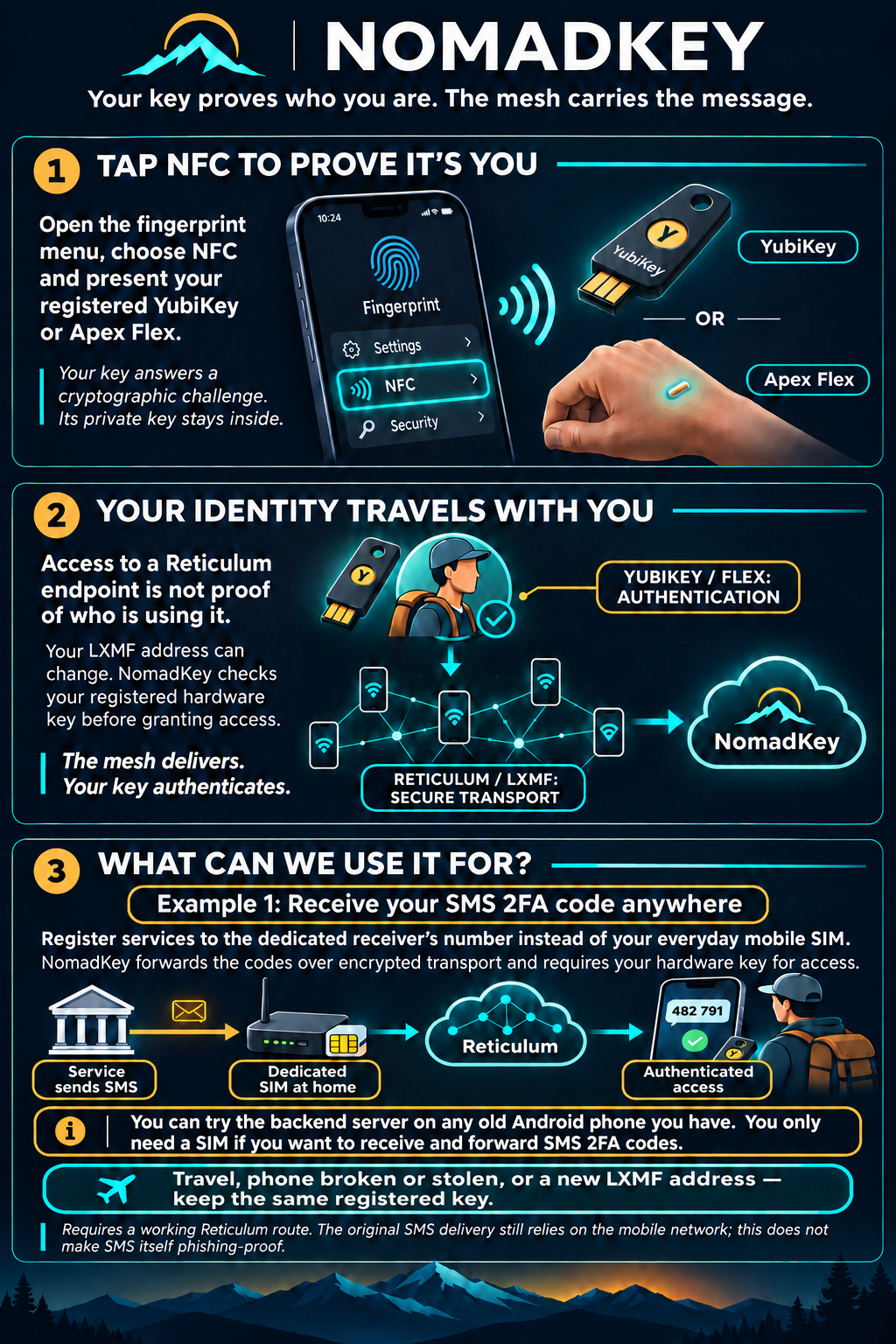
Some parts of my setup have been deliberately left out for security reasons. 😉
At the moment, I’m using my own custom branch of Columba, which includes the NFC authentication option I’ve developed. Hopefully, it will be incorporated into the main program soon.
Both my modified version of Columba, with NFC authentication, and the Android backend server for the home-based phone are available on GitHub:
The next challenge will be to intercept email-based 2FA codes and forward them securely over the Reticulum network.
My idea is to create a rule on the mail server that automatically forwards these messages into Reticulum without ever allowing them to appear in my inbox.
That way, even if my email account, PC or phone is compromised or stolen, the attacker won’t simply find my email-based 2FA codes sitting in my inbox.
Of course, I realise that a sufficiently determined hacker who gains access to the mail server could discover the rule, disable it or potentially intercept the messages before they’re forwarded.
Maybe it’s time to run my own mail server as well!
Stay safe,
BD